
Use cases · Travel eSIM
Travel eSIM testing and monitoring for every destination you sell
Travel eSIM testing checks that a plan sold for a destination actually works there: the profile installs, attaches to the partner networks you rely on, delivers usable speed and lets the traveler browse. SimCheck.ai runs those checks on real modems with your own profiles, then repeats them on a schedule — so a broken destination shows up in your reports before it shows up in your app store reviews.
You sell destinations you never see
A travel eSIM brand sells plans for many countries, delivered through a handful of wholesale suppliers and dozens of visited networks. The traveler meets the network on arrival — often at an airport, with no Wi-Fi to fall back on. If the profile lands on a partner that has dropped the agreement, if data is routed through another continent and crawls, or if one destination needs a different APN, the first report is a one-star review or a refund request.
Spot checks don't keep up. Suppliers change routing, visited networks change steering, and a destination that worked last month can quietly degrade. Local SIM purchases, staff testing on their travels and support tickets give you anecdotes, not a per-destination quality record you can act on — or hold a supplier to.
How travel eSIM monitoring works
- 1
Load the plans you sell
Add each plan's profile as an activation code or QR, tag it with its network, and group profiles by destination or supplier. Download limits track single-use codes.
- 2
Test each destination's networks
Run on the SimCheck network or your own edge devices, force each partner network by PLMN, and check attach, data, speed and SMS.
- 3
Browse like a traveler
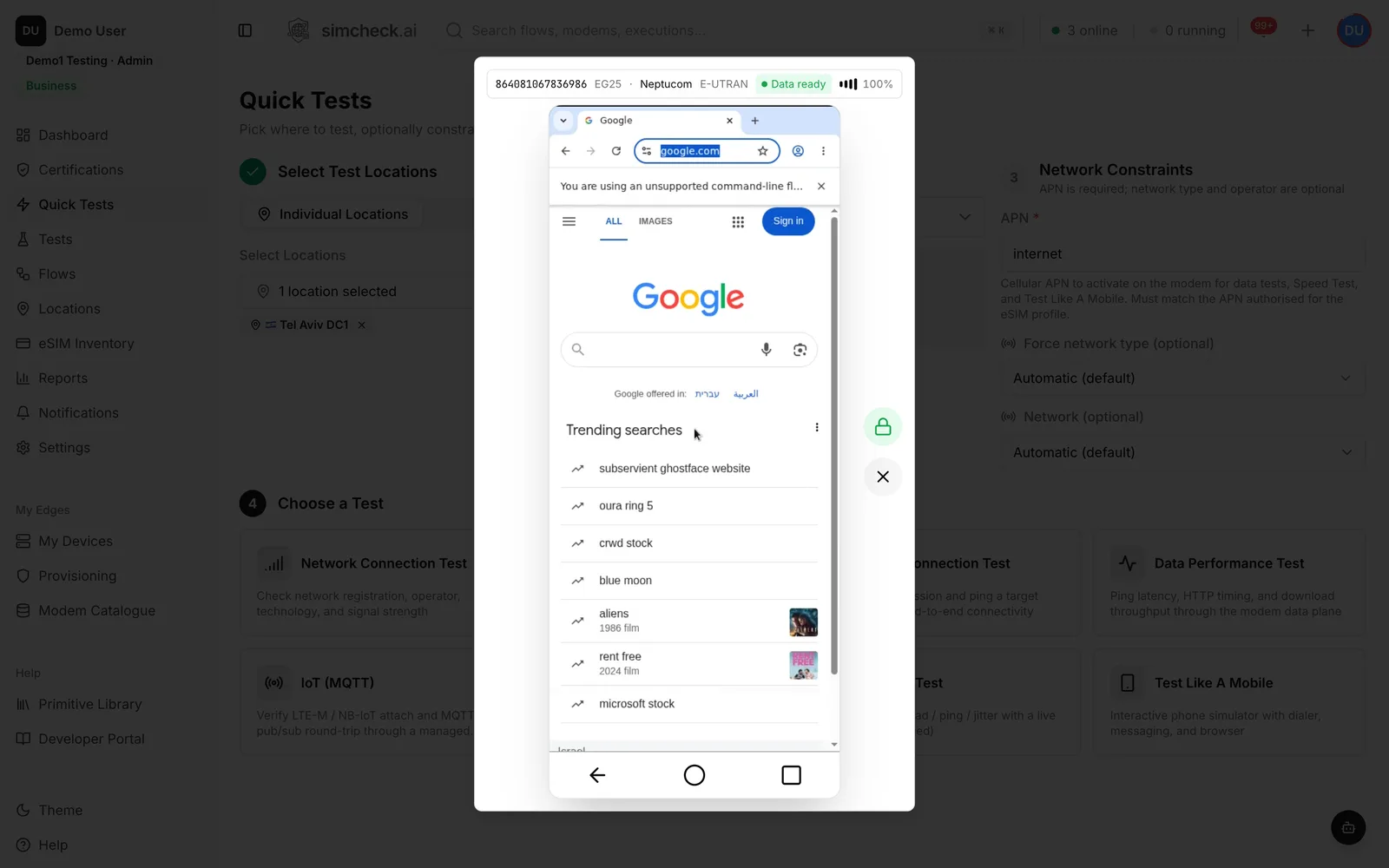
Open Test Like A Mobile to load real pages in a Chromium browser over the eSIM's data connection, including any captive or top-up portal.
- 4
Monitor on a schedule
Save a configuration per destination, run it on a recurring interval, and get a report by email only when something fails.
Built for the questions travel eSIM teams ask
Partner networks by PLMN
Check each visited operator a destination relies on, one at a time, instead of whichever network the modem happens to pick.
Real speed numbers
Download, upload, ping, jitter and bufferbloat from a LibreSpeed-based speed test, plus iperf3 throughput with jitter and loss.
Browsing as a traveler
Test Like A Mobile runs a real browser over the cellular link, localized to the SIM's network, so you see what the traveler sees.
Data path diagnostics
A built-in report separates DNS, ping, HTTP fetch and raw throughput, showing which part of the data path is slow.
Country-level quality
Built-in reports compare latency, throughput and packet loss by visited country, and attach success by visited operator.
Supplier comparison
Group by home operator or eSIM profile in the report builder to compare the same destination across wholesale suppliers.
Failure-only alerts
Email a report each time a monitoring test completes, set to send only on failure, so a healthy week stays quiet.
AI that reads your history
Ask the in-app AI assistant to analyze recent failures, or query results from Claude Desktop or Cursor through an MCP key.
What to check for each destination
- Install — the profile installs from the activation code or QR your customer receives.
- Attach on each partner — every visited network in the plan accepts the profile, on LTE and 5G where you advertise them.
- Data comes up — the APN is correct and DNS resolves.
- Speed is usable — download, upload and latency match what you promise for that destination.
- Browsing works — common sites load, and any captive or top-up portal behaves as expected.
- SMS — if the plan includes a number, messages are delivered.
- It stays working — the same checks pass tomorrow, next week and after the supplier changes something.
The full list is in the eSIM testing checklist.
Why home routing shows up in your reviews
Many travel eSIMs use profiles from an operator in one country that roam onto partners in the destination. Roaming data is often home-routed: traffic travels back to the home network's gateway before reaching the internet. That adds latency, can make websites think the traveler is in another country, and leaves the experience dependent on the path between visited and home networks. Some plans use local breakout to avoid it.
A coverage map shows none of this. A ping time, a slow HTTP fetch and a browser serving pages for the wrong country show all of it — and that is what SimCheck.ai measures on a real modem in the destination. Adding home operator to the data performance by country report compares suppliers side by side and turns "customers say Spain is slow" into a specific supplier and partner network. Partner selection itself is covered in roaming testing and steering of roaming.
A monitoring cadence that matches what you sell
Not every destination needs the same attention. A practical starting point:
| Destination tier | Checks | Cadence |
|---|---|---|
| Top sellers | Attach on each partner, data, speed test | Several times a day |
| Long tail | Attach and data connection | Daily or weekly |
| New or changed supplier | Full suite, including browsing and SMS | Before launch, then daily for two weeks |
| After a complaint | Same suite on the reported partner, forced by PLMN | Immediately, then scheduled |
Every scheduled run lands in the same history and reports. One token covers a test of up to five minutes of modem time, so a monitoring budget is easy to size — see pricing.
Frequently asked questions
How do you test a travel eSIM before selling a destination?
Install the plan's profile on a real device in the destination, check attach on each partner network, bring up data, run a speed test and load a few web pages. SimCheck.ai does this on real modems, with each partner forced by PLMN.
Can I test a travel eSIM without being in the country?
Yes. Tests run on real modems at sites on the SimCheck network or on your own edge devices, using your own profiles. You choose the location in a browser and get results in minutes.
How do I find out which network my travel eSIM uses in a country?
Run a Network Connection Test with automatic network selection. The result shows the operator and PLMN, radio technology, band and signal. The coverage by operator report then shows which networks you land on over time.
Why is my travel eSIM slow in some countries?
Common causes are home-routed data, a congested or weaker partner network, steering toward a non-preferred network, or a throttled plan. Comparing speed and latency per partner and per supplier shows which one applies.
How often should travel eSIM destinations be tested?
Best-selling destinations several times a day, the long tail daily or weekly, and any new or changed supplier in full before launch. Scheduled tests with failure-only email reports make this manageable.
Does repeated testing use up my eSIM profiles?
The inventory tracks each profile's download limit and installs used, and shows which modem a profile is already installed on, so you can plan repeat tests around single-use activation codes.
Keep exploring
- Use casesRoaming TestingLock tests to each partner by PLMN, verify data, SMS and voice, and track every pair in a roaming matrix.
- PlatformTest Like A MobileAn interactive phone on a real modem with dialer, SMS and a real Chromium browser running over the cellular link.
- SolutionsFor MVNOs & eSIM ProvidersTest every profile batch, verify partner networks per country and reproduce customer tickets on real modems.
- LearnThe eSIM testing checklist: what to test, from download to roaming, with pass criteriaAn eSIM testing checklist covering provisioning, attach, data, SMS, VoLTE, roaming, IoT and QoS, with a pass criterion for every check and tips to automate.
- Use caseseSIM TestingVerify the full eSIM chain — download, install, attach, data, SMS, voice and roaming — on real modems with your own profiles.
- ProducteSIM Testing Pricing – Plans from $99/monthSimCheck.ai pricing: Prototyper from $99/month with your own edge device, Business with 500 test tokens a month, and Enterprise with unlimited testing.
Know every destination works before your travelers land
Start a 30-day free trial, or talk to us about monitoring the destinations you sell.