
Platform · Quick Tests
One-click eSIM and network tests on real modems
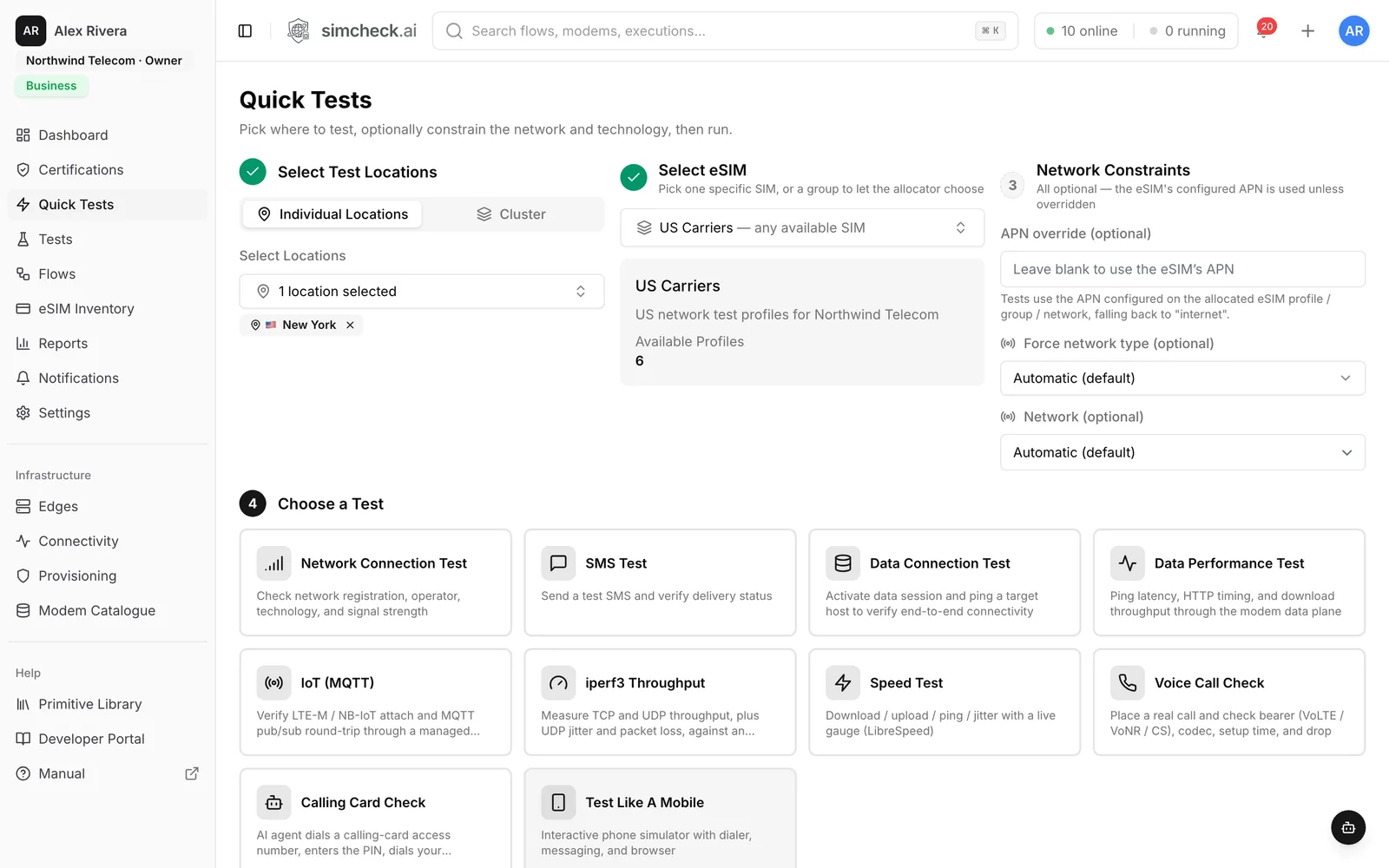
Quick Tests turn a full field-test setup into three choices: where to test, which eSIM to use and what to check. SimCheck.ai allocates a free modem at that location, installs the profile, runs the test and returns a pass/fail verdict with logs, decoded signaling and packet captures — in minutes, without shipping SIM cards or sending an engineer.
Field testing shouldn't need a plane ticket
Checking whether an eSIM profile attaches, registers and passes traffic in another country usually means shipping devices, coordinating with a local partner or asking a specialist engineer to drive the test by hand. Each check takes days, and the results arrive as screenshots and spreadsheets that nobody can compare.
Quick Tests replace that with a repeatable, self-service check that anyone on the team — roaming managers, support, QA or product — can run from a browser and share as a link.
How a Quick Test works
- 1
Choose where to test
Pick one or more locations, or a cluster of sites, from the SimCheck network or your own edge devices.
- 2
Choose the eSIM
Select a specific eSIM profile or a group and let the allocator pick any free profile in it.
- 3
Add constraints (optional)
Force the radio technology — 5G SA, 5G NSA, LTE, LTE-M, NB-IoT, 3G or 2G — or a specific operator by PLMN, and override the APN.
- 4
Run and read the verdict
Results show an overview, step-by-step logs, decoded signaling with any reject cause, and downloadable artifacts such as packet captures.
Ten tests, ready to run
Every test runs on a real cellular modem with a real eSIM profile on a live network.
Network Connection Test
Attach and report registration state, operator, radio technology, band and signal strength (RSRP, RSRQ, SINR) — without using data.
SMS Test
Send an SMS and verify delivery status end to end.
Data Connection Test
Open a data session, resolve DNS and ping a target host to prove end-to-end connectivity.
Data Performance Test
Measure ping latency, HTTP timing and download throughput through the modem's data plane.
IoT (MQTT)
Attach on LTE-M or NB-IoT and complete an MQTT publish/subscribe round trip through a managed broker.
iperf3 Throughput
Measure TCP and UDP throughput, plus UDP jitter and packet loss, against an iperf3 server.
Speed Test
Download, upload, ping, jitter and bufferbloat with a live gauge, based on LibreSpeed.
Voice Call Check
Place a real call and see IMS registration, the bearer used (VoLTE or circuit-switched), setup time, talk time and outcome — with a call recording.
Calling Card Check
An AI agent dials a calling-card access number, enters the PIN, dials the destination and returns a transcript with a pass/fail verdict.
Test Like A Mobile
Open an interactive phone on the modem — dialer, SMS and a real browser running over the cellular link.
Results you can act on
Every run keeps its evidence. The Overview tab gives the verdict and key measurements; Logs show each step; Signaling decodes the radio messages so you can see exactly where an attach failed and which reject cause the network returned; Artifacts hold packet captures and traces for deeper analysis. Failed runs show the failure reason inline, and any run can be retried with one click.
From one-off check to monitoring
A Quick Test is the fastest way to answer "does this eSIM work here, right now?". When the answer matters every day, save the same setup as a configuration and schedule it to run on an interval, or chain several checks into a flow. Results feed the same reports and roaming matrix.
Frequently asked questions
Do I need my own hardware to run Quick Tests?
No. You can run tests on the shared SimCheck network, where capacity is shown per site. You can also connect your own edge device with a supported modem; tests on your own devices don't consume tokens.
Which eSIM profiles can I test?
Any profile you can provide as an activation code (LPA string) or QR code. Profiles live in your eSIM inventory, can be grouped, and support download limits such as single-use or a fixed count.
Can I force a specific network or technology?
Yes. You can force the radio access technology (5G SA, 5G NSA, LTE, LTE-M, NB-IoT, 3G or 2G) and lock the test to a specific operator by its PLMN code, which is how roaming partners are checked one by one.
How long does a Quick Test take?
Most tests finish in a few minutes. One token covers up to five minutes of modem time.
Keep exploring
- Use caseseSIM TestingVerify the full eSIM chain — download, install, attach, data, SMS, voice and roaming — on real modems with your own profiles.
- Use casesRoaming TestingLock tests to each partner by PLMN, verify data, SMS and voice, and track every pair in a roaming matrix.
- PlatformTest Like A MobileAn interactive phone on a real modem with dialer, SMS and a real Chromium browser running over the cellular link.
- PlatformFlow Builder & SchedulingCompose multi-step tests from validated primitives on a visual canvas, then schedule, track and report on them.
- ProducteSIM Testing Pricing – Plans from $99/monthSimCheck.ai pricing: Prototyper from $99/month with your own edge device, Business with 500 test tokens a month, and Enterprise with unlimited testing.
Run your first Quick Test
Start a free trial with test tokens included, or talk to us about testing your eSIM profiles across your target markets.