
Platform · AI Assistant
AI telecom testing in plain English
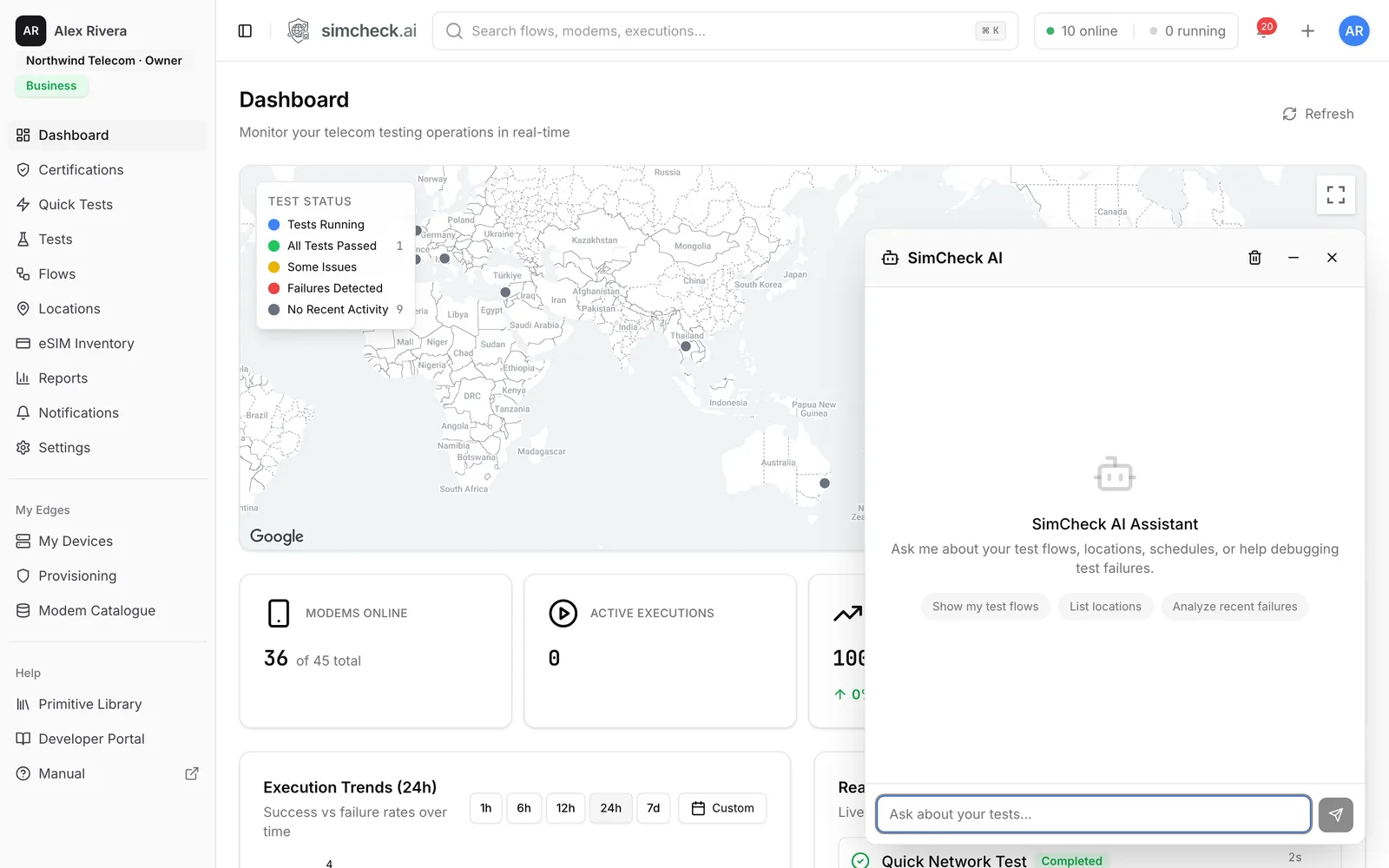
SimCheck.ai's AI assistant understands your organization's flows, locations, schedules and test history, so you can ask questions and start tests in natural language instead of clicking through screens. It looks up results, analyzes recent failures, helps build flows and starts tests once you approve them, either inside the console or from Claude Desktop, Cursor or any MCP client using a key with the permissions you choose.
Test data is only useful if people can ask it questions
A testing platform quickly accumulates thousands of runs, each with an operator, a radio technology, a band, signal levels, latency and, when something breaks, a reject cause. Finding out why roaming in one destination failed overnight means filtering history, opening runs and reading logs and signaling. The roaming manager, support agent or product owner who needs the answer often doesn't know where to click.
Natural language removes that barrier. The in-app assistant answers questions about your own data and can act on your behalf with your approval, and the Model Context Protocol (MCP) brings the same access into the AI tools your engineers already use, under permission levels your admins control.
How the assistant works
- 1
Ask in plain English
Open the assistant from the button in the corner of the console and ask, for example, "show my test flows", "list locations" or "analyze recent failures".
- 2
It looks things up for you
The assistant works from your organization's flows, locations, schedules and history, so answers come from your real test runs rather than general knowledge.
- 3
You approve anything that acts
Read-only questions are answered directly. Starting a test, creating a schedule or any other change waits for your approval.
- 4
Results land where they always do
Tests the assistant starts are ordinary runs: they appear under Running and History with the same logs, signaling and artifacts as runs you start yourself.
What the assistant and MCP can do
The same capabilities are available in the console and, through a scoped key, in any MCP client.
Instant lookups
Ask for flows, locations, schedules or recent results without navigating the console.
Failure analysis
Ask the assistant to analyze recent failures and it reviews your history and points at likely causes, so you start the investigation with a hypothesis instead of a filter.
Natural-language test creation
Describe the test you want in plain English and the assistant helps build it as a flow from the platform's validated primitives.
Tests started on approval
Ask it to run a check at a location and it prepares the run, then starts it only after you confirm.
MCP for Claude Desktop, Cursor and more
Connect Claude Desktop, Cursor or any client that speaks the Model Context Protocol to list locations and flows, read results and, if the key allows it, start tests.
Three permission levels
Each MCP key is Read Only, Execute Flows or Full Access, with an optional expiry of 30 days, 90 days or a year, and can be revoked at any time.
Separate from API keys
MCP keys are issued separately from API keys, so you can cut off an assistant without breaking the scripts and CI jobs that use the API.
API, webhooks and Developer Portal
Everything in the console is also available programmatically, with webhooks for events and a Developer Portal holding the API reference, quick-start snippets and MCP setup.
MCP permission levels
Each MCP key carries exactly one permission level. Choose the lowest level that does the job.
| Level | What the connected assistant can do |
|---|---|
| Read Only | Look, not touch: flows, test results and history, locations, networks, reports and eSIM inventory. It cannot start a test. |
| Execute Flows | Everything Read Only can, plus run tests and flows and create schedules. Runs use your organization's tokens exactly like runs started in the console. |
| Full Access | Every operation the integration offers, including managing schedules and configuration. |
Only owners and admins can create or revoke keys. A new key is shown once, the key list shows when each key was last used, and revoking a key cuts off any assistant using it on its next request.
Example prompts
Once a key is configured, start with something simple to confirm the connection, then ask real questions:
- "List my SimCheck locations."
- "Which tests failed in the last 24 hours, and what do the failures have in common?"
- "Show the success rate by visited operator for my roaming group this week."
- "Run the network connection check on the IoT group at my lab site, forced to LTE-M." (needs Execute Flows)
- "Schedule the data performance flow every six hours on my roaming cluster." (needs Execute Flows)
See Testing eSIMs from Claude and Cursor with MCP for a longer walkthrough and the guardrails we recommend.
Built on the same platform as everything else
The assistant doesn't run tests of its own kind. It starts the same Quick Tests and flows you can start by hand, on real modems with real eSIM profiles on the SimCheck network or your own edge devices, and every result keeps its logs, decoded signaling and packet captures. For scripted automation, use API keys and webhooks from the Developer Portal; the Custom HTTP option also offers a plain chat endpoint that takes a question in natural language. See how this supports eSIM testing end to end.
Frequently asked questions
Which AI tools can connect to SimCheck.ai?
Claude Desktop, Cursor and any other client that supports the Model Context Protocol. The setup guide in Settings has a ready-to-copy configuration for Claude Desktop and Cursor, plus a Custom HTTP option for building your own integration.
Can the assistant start tests without my permission?
The in-app assistant asks for your approval before starting a test, creating a schedule or making any other change. An external MCP client can only start tests if its key has the Execute Flows or Full Access level; a Read Only key cannot start anything.
Do tests started by the assistant use tokens?
Yes, on the same terms as tests you start yourself. On the SimCheck network one token covers a test of up to five minutes of modem time; tests on your own edge devices don't consume tokens.
Who can create MCP keys?
Everyone in the organization can see the list of keys, but only owners and admins can create or revoke them. Give each person or tool its own key and prefer an expiry date.
What happens if an MCP key is exposed?
Revoke it from the AI Integration settings. Any assistant using it loses access on its next request. Revocation can't be undone, so issue a new key for the legitimate user.
Keep exploring
- BlogTesting eSIMs from Claude and Cursor with MCPHow the Model Context Protocol lets telecom QA teams read eSIM test results, analyze failures and run flows from Claude or Cursor, within set permissions.
- PlatformFlow Builder & SchedulingCompose multi-step tests from validated primitives on a visual canvas, then schedule, track and report on them.
- PlatformQuick TestsTen ready-made tests — attach, SMS, data, speed, iperf3, MQTT, voice and more — run on real modems in one click.
- Use caseseSIM TestingVerify the full eSIM chain — download, install, attach, data, SMS, voice and roaming — on real modems with your own profiles.
- ProducteSIM Testing Pricing – Plans from $99/monthSimCheck.ai pricing: Prototyper from $99/month with your own edge device, Business with 500 test tokens a month, and Enterprise with unlimited testing.
Ask your test history a question
Start a free trial and put your first questions to the assistant, or talk to us about connecting SimCheck.ai to the AI tools your team already uses.