
Use cases · eSIM Testing
eSIM testing, end to end, on real modems and live networks
eSIM testing verifies the whole chain behind a working subscription: the profile downloads and installs on a real eUICC, enables, attaches to the intended network and then delivers data, SMS and voice — at home and while roaming. SimCheck.ai automates every step on real cellular modems with your own eSIM profiles, on the SimCheck network or your own edge devices, and returns a verdict with logs, decoded signaling and packet captures.
An eSIM has more ways to fail than a plastic SIM
A physical SIM either works in a device or it doesn't. An eSIM puts a provisioning chain in front of the network: the activation code must point at the right SM-DP+, the eUICC must download, install and enable the profile, and only then does the device try to attach. Then come the familiar questions — right network and radio technology, right APN, working data, SMS and calls, and all of it still holding when the subscriber crosses a border. A failure at any step looks the same to the customer: "my eSIM doesn't work."
Most teams still test this by hand, with a drawer of phones, devices shipped to a partner or a contractor in the target country. Results arrive days later as screenshots, can't be repeated on demand and rarely explain why something failed. Meanwhile profiles, roaming agreements and network settings keep changing, so last quarter's pass proves little about today.
How eSIM testing works on SimCheck.ai
- 1
Add your profiles
Register each eSIM as an activation code (LPA string) or QR code, tag it with its network from 2,400+ mobile networks, set its download limit and group related profiles.
- 2
Choose where and how
Pick locations, a cluster of sites or your own edge device. Optionally force the radio technology, lock an operator by PLMN or override the APN.
- 3
Run the checks
Launch a Quick Test, saved configuration or flow. A free modem is allocated, the profile installs through SGP.32 (via a cloud eIM) or an SGP.22-style LPA, and the test runs on the live network.
- 4
Read, schedule and report
Review the verdict, logs, decoded signaling and packet captures, then schedule the test on an interval and track it in reports.
Everything an eSIM has to prove
Each check runs on a real cellular modem with a real eSIM profile on a live network.
Profile download and install
Profiles install through SGP.32 via a cloud eIM or an SGP.22-style LPA, chosen per modem. A failed install says why — bad activation code, exhausted download limit or no room on the modem.
Attach and registration
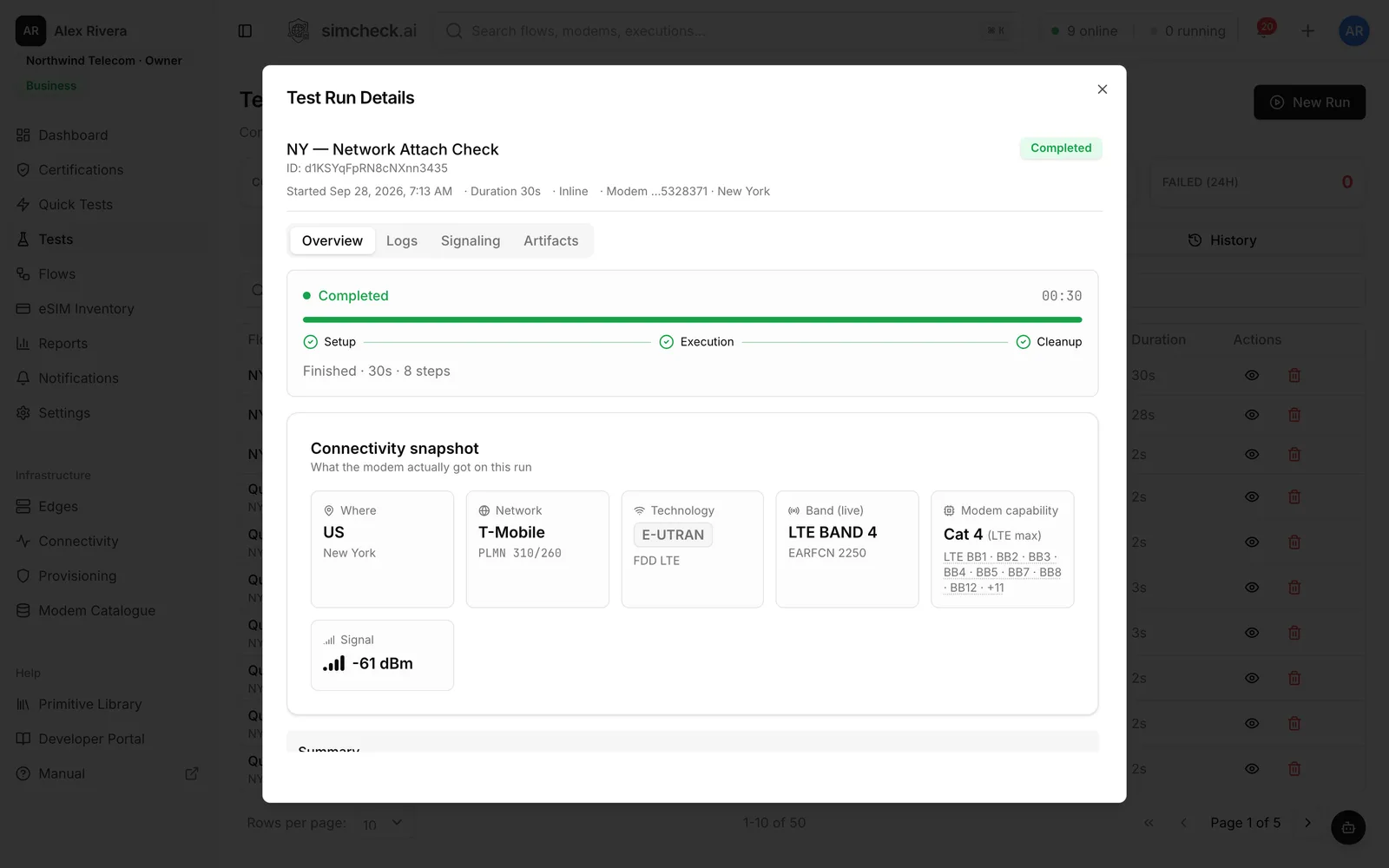
Registration state, operator, radio technology, band and RSRP, RSRQ and SINR — without using data.
Data and performance
DNS and ping, latency and HTTP timing, iperf3 TCP and UDP throughput with jitter and loss, and a speed test with bufferbloat.
SMS and voice
SMS delivery status, and real calls reporting IMS state, bearer (VoLTE, VoNR or circuit-switched), setup time, outcome and a recording.
IoT checks
Attach on LTE-M or NB-IoT and complete an MQTT publish/subscribe round trip through a managed broker.
Roaming by PLMN
Force a visited operator to test partners one at a time, then see every home and visited pair in the roaming matrix report.
Test Like A Mobile
An interactive phone on the modem — dialer, SMS and a real Chromium browser over the cellular link.
Evidence, not screenshots
Every run keeps step logs, decoded signaling with any network reject cause, and artifacts such as packet captures. Failed runs retry in one click.
What eSIM testing covers
A complete eSIM test plan follows the subscriber's path from activation code to a working call. Each layer can fail on its own, so each needs its own check.
| Layer | What to verify | How SimCheck.ai checks it |
|---|---|---|
| Provisioning | Profile downloads, installs and enables | Install through an SGP.32 eIM or SGP.22-style LPA, with the failure reason inline |
| Registration | Attaches to the intended operator and technology | Network Connection Test, forced RAT and PLMN, decoded reject cause |
| Data | APN, DNS, latency, throughput | Data Connection, Data Performance, iperf3, Speed Test |
| Messaging | SMS is delivered | SMS Test |
| Voice | IMS registration, bearer, setup and outcome | Voice Call Check, Calling Card Check |
| Roaming | Each partner works; steering behaves | PLMN-forced tests, roaming matrix report |
| Experience | What a subscriber sees in a browser | Test Like A Mobile |
| Quality over time | Results stay stable | Scheduled tests, reports, email delivery |
Consumer eSIMs follow SGP.22, where the user triggers the download through the device's LPA. IoT eSIMs follow SGP.32, where a remote eIM drives it. The checks after installation are the same; the provisioning path is not. For a full list, see the eSIM testing checklist; if a profile won't install, start with eSIM profile download errors.
Manual vs automated eSIM testing
Manual testing — a person with a phone in the target market — still helps for exploratory checks. It does not scale to dozens of profiles, partners and countries, and it cannot run every night.
| Manual field testing | Automated on SimCheck.ai | |
|---|---|---|
| Setup | Ship devices or hire a local tester | Pick a location in the browser |
| Time to result | Days | Minutes |
| Repeatability | Depends on who runs it | The same saved configuration every time |
| Evidence | Screenshots and notes | Logs, decoded signaling, packet captures |
| Coverage | One market at a time | A cluster fans one test out across many sites |
| Monitoring | Rarely repeated | Scheduled, with failure-only email reports |
Automation keeps the human view too: Test Like A Mobile lets an engineer browse, text and call on the same modem, and you can describe a test in plain English to the AI assistant, which builds it and starts it once you approve.
Who needs eSIM testing
Every team that sells or depends on an eSIM needs proof that it works where customers use it:
- Operators, MVNOs and eSIM providers verify profiles from their SM-DP+, every roaming partner and voice. See roaming testing, VoLTE and voice testing and MVNOs and eSIM providers.
- Travel eSIM brands sell destinations they never see. See travel eSIM quality monitoring.
- IoT providers and device makers need SGP.32 IoT eSIM testing and IoT connectivity testing.
- Operators rolling out 5G need 5G SA testing for standalone registration, throughput and latency.
- Teams watching specific networks — rare partners, satellite networks, multi-day stability — use PLMN hunt and network monitoring.
- Automotive and enterprise IoT programs validate every market they ship to. See automotive and enterprise.
Frequently asked questions
What is eSIM testing?
eSIM testing checks that a profile downloads, installs and enables on a device's eUICC, then attaches to the intended network and delivers data, SMS and voice, including while roaming. It is most reliable on real devices and live networks, where provisioning and network failures actually show up.
How do you test an eSIM profile before launch?
Install the profile on a real device in each target market, then run an attach check, a data session, an SMS and a voice call, and repeat on each roaming partner by forcing the visited network. Save the setup so it can be re-run after every change.
What is the difference between testing SGP.22 and SGP.32 eSIMs?
With SGP.22 (consumer), the user triggers the download through the device's LPA, usually from a QR code. With SGP.32 (IoT), a remote eIM instructs the device's IoT Profile Assistant to download and switch profiles. The network checks afterwards are the same. SimCheck.ai supports both, chosen per modem.
Do I need my own hardware or to travel for eSIM testing?
Neither. Tests run on real modems on the shared SimCheck network, locked to a visited operator by PLMN when needed. For a specific location or long-running monitoring, connect your own edge device — any Linux box with a supported Quectel modem (BG95-M3, EG25-G, EM120R-GL or RM520N-GL). Tests on your own devices don't consume tokens.
How much does eSIM testing cost?
Plans start at $99 per month for testing on your own edge device. Business is $999 per month with 500 tokens (one token covers one test of up to five minutes of modem time), and Enterprise is custom. Every plan starts with a 30-day free trial, no credit card required.
Keep exploring
- Use casesSGP.32 IoT eSIM TestingProve SGP.32 profiles download via an eIM, switch cleanly, attach and pass MQTT traffic on live networks.
- Use casesRoaming TestingLock tests to each partner by PLMN, verify data, SMS and voice, and track every pair in a roaming matrix.
- PlatformQuick TestsTen ready-made tests — attach, SMS, data, speed, iperf3, MQTT, voice and more — run on real modems in one click.
- LearnThe eSIM testing checklist: what to test, from download to roaming, with pass criteriaAn eSIM testing checklist covering provisioning, attach, data, SMS, VoLTE, roaming, IoT and QoS, with a pass criterion for every check and tips to automate.
- GlossaryeUICC (Embedded Universal Integrated Circuit Card)An eUICC is the secure chip inside an eSIM device that can store and switch between multiple operator profiles downloaded over the air.
- ProducteSIM Testing Pricing – Plans from $99/monthSimCheck.ai pricing: Prototyper from $99/month with your own edge device, Business with 500 test tokens a month, and Enterprise with unlimited testing.
Start testing your eSIM profiles
Start a 30-day free trial with no credit card, or talk to us about testing your profiles in every market you sell.