
Solutions · MVNOs & eSIM providers
eSIM testing for MVNOs and travel eSIM brands
SimCheck.ai lets MVNOs and travel eSIM providers prove that what they sell actually works. Test each profile batch before it goes on sale, check every partner network in a destination one PLMN at a time, monitor quality in the countries you sell and reproduce customer tickets on a real modem with the same kind of profile. Every test runs on a real cellular modem on a live network, on the SimCheck network or on your own edge devices.
Your customers find the broken destinations before you do
A travel or MVNO plan for a country depends on wholesale and roaming agreements with one or more visited networks you don't control. Profiles are bought in batches, sold online and installed thousands of miles from your office. When a batch has bad activation codes, a partner network stops accepting your subscribers or an APN changes, the first signal is often a refund request or a one-star review.
Checking a destination properly usually takes a handset in the country and someone to drive it. SimCheck.ai turns that into a routine: a real modem, a real profile from your inventory, a live network and evidence attached to every result, run on demand or on a schedule by anyone on the team.
A testing routine from batch to destination
- 1
Load the batch
Add activation codes or QR codes one at a time or by CSV batch upload, tag each profile with its network, set its download limit and file it in a group for its destination.
- 2
Test before sale
Run a Network Connection, Data Connection or SMS test against the group. The allocator picks a free profile, so you can sample a new batch without choosing codes by hand.
- 3
Verify each partner network
Lock the test to one visited operator at a time by its PLMN and, where needed, force LTE, 5G or another technology to confirm which partners actually take your SIMs.
- 4
Monitor the destinations you sell
Schedule recurring data and speed tests per destination group and have a report emailed only when something fails.
- 5
Reproduce customer tickets
When a customer reports a problem, open Test Like A Mobile with a profile from the same group on the same network and see what they see.
Built for teams that sell eSIMs
Everything runs on real modems with real eSIM profiles on live networks, with evidence kept for every run.
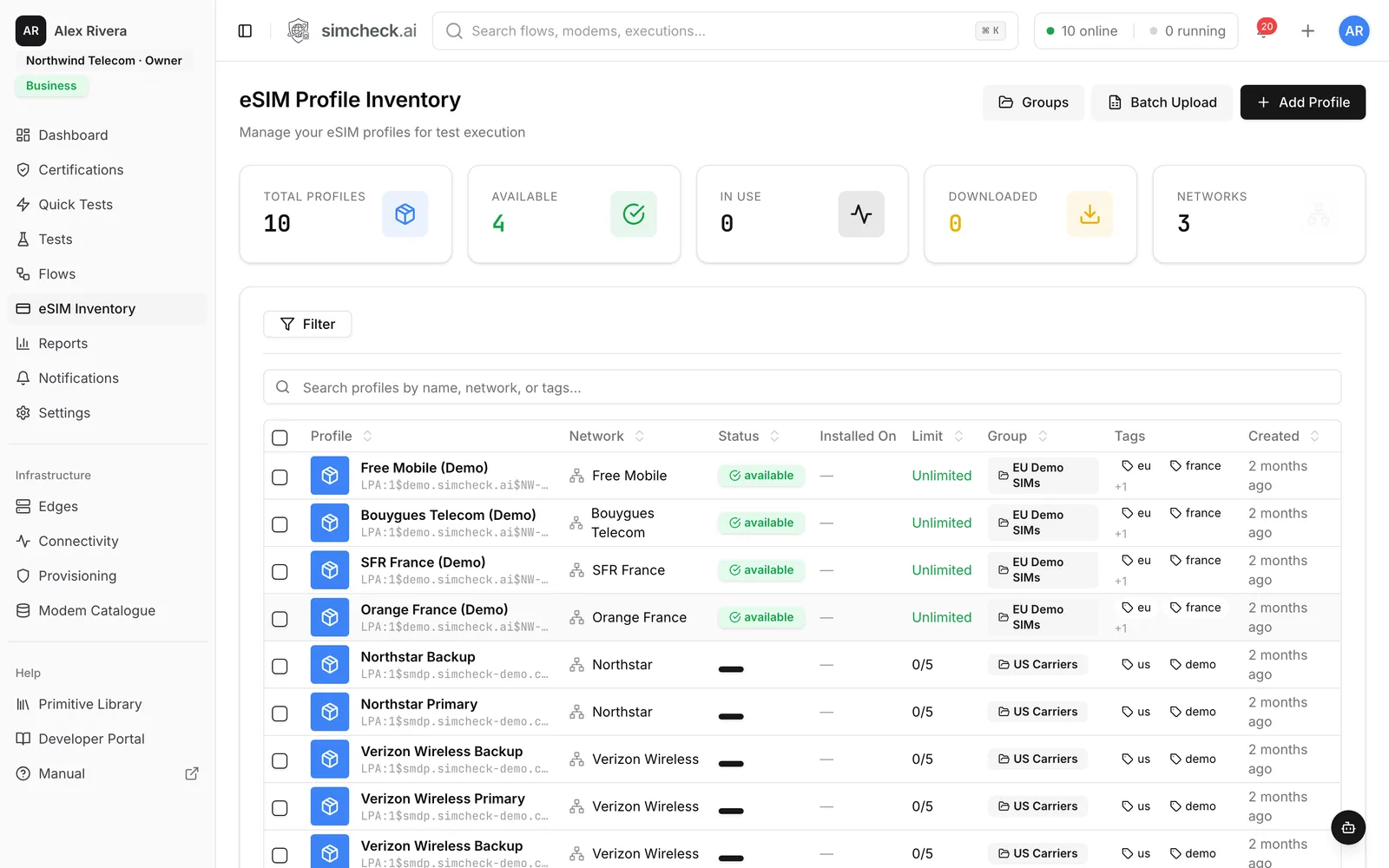
Batch-ready eSIM inventory
Add profiles as LPA activation codes or QR codes, or upload a CSV batch. Tag each one with its network from a catalogue of 2,400+ mobile networks and see whether it is available, downloaded or in use.
Download limits that match your codes
Mark each activation code Unlimited, Single Use or limited to a fixed count. A counter shows how many installs are left, so a code consumed by testing is flagged as exhausted.
Groups per destination
Organize profiles into color-coded groups, one per destination or plan. A test that targets a group picks any free profile, and profiles inherit the group's APN unless you override it.
PLMN locking per partner
Force a test onto a specific visited operator by PLMN to check roaming and wholesale partners one by one, and force the radio technology to check 5G or LTE availability.
Roaming matrix and coverage reports
The Roaming matrix shows which home operator works on which visited operator, alongside Coverage by operator and data performance by country.
QoS monitoring of sold destinations
Recurring data performance, speed and iperf3 tests track latency, throughput and packet loss per destination over days and weeks.
Customer ticket reproduction
Test Like A Mobile gives you a live phone on a real modem, with a dialer, SMS and a real Chromium browser over the cellular link.
Evidence for partner escalations
Decoded signaling shows the network's reject cause, packet captures are kept as artifacts, and reports export to CSV or PDF for your wholesale partners.
Questions SimCheck.ai answers for eSIM providers
| Question | How to answer it |
|---|---|
| Does this new batch install and attach? | Run a Network Connection Test against the batch's group before it goes on sale. |
| Which partner networks in a country actually take our SIMs? | Lock tests to each visited PLMN in turn and read the Roaming matrix. |
| Is data quality in our top destinations holding up? | Schedule recurring Data Performance or Speed Tests and watch data performance by country. |
| Why can't this customer browse or reach the top-up page? | Open Test Like A Mobile with a profile from the same group on the same network. |
| Does voice work on this plan? | Run the Voice Call Check to see IMS state, the bearer used and the call outcome. |
Evidence your wholesale partners will act on
"It doesn't work in that country" rarely gets a fix. A run that shows the visited PLMN, the radio technology, signal levels and the reject cause the network returned, with a packet capture attached, usually does. Use the roaming testing guide to structure partner checks, and see common eSIM profile download errors for the failures to expect when a batch goes wrong. For a partner-by-partner approach across many countries, see the roaming testing use case.
From one lab to every destination
Start on the shared SimCheck network with no hardware, then add your own edge devices in the markets you care about most: any Linux box with a supported Quectel modem. Tests on your own devices are free on every plan. For a destination-by-destination monitoring setup, see travel eSIM quality monitoring, and compare plans on the pricing page.
Frequently asked questions
Does testing a single-use activation code use it up?
Yes. Installing a profile on a modem uses one of its downloads, the same as a customer install would. The inventory tracks the count for every code, so plan to test a sample from each batch or use codes that allow several downloads for ongoing monitoring.
Do we need to integrate with our SM-DP+ or eSIM supplier?
No. You add profiles as the same activation codes or QR codes your customers receive, either one by one or as a CSV batch.
How do we check one specific roaming partner?
Lock the test to that operator by its PLMN code. The modem attaches only to that network, so the result tells you whether that partner accepts your profile and what service it delivers.
Can we test in a country where we have no team?
Yes. Run tests on the SimCheck network, or place your own edge device (a Linux box with a supported Quectel modem) wherever you need coverage and manage it from the console.
How do we hear about a destination that degrades?
Schedule a recurring test per destination group and set its report delivery to email only on failure. Webhooks can also push results into your own support or monitoring tools.
Can we reproduce what a customer saw?
Yes. Test Like A Mobile opens a live phone on a real modem with a profile from the same group on the same network, including a real browser running over the cellular link.
Keep exploring
- Use casesTravel eSIM MonitoringVerify each destination's partner networks, speed and browsing on real modems, and monitor every country you sell.
- Use casesRoaming TestingLock tests to each partner by PLMN, verify data, SMS and voice, and track every pair in a roaming matrix.
- PlatformTest Like A MobileAn interactive phone on a real modem with dialer, SMS and a real Chromium browser running over the cellular link.
- PlatformQuick TestsTen ready-made tests — attach, SMS, data, speed, iperf3, MQTT, voice and more — run on real modems in one click.
- LearneSIM profile download failed: causes, error codes and how to test downloadsWhy eSIM profile downloads fail, from bad activation codes and TLS errors to full eUICCs and used QR codes, plus how to diagnose and test downloads.
- ProducteSIM Testing Pricing – Plans from $99/monthSimCheck.ai pricing: Prototyper from $99/month with your own edge device, Business with 500 test tokens a month, and Enterprise with unlimited testing.
Test what you sell before your customers do
Start a free trial and run your first batch check on real modems, or talk to us about monitoring the destinations you sell.