
Platform · Edges & Network
Use our network, or turn your own Linux box into an eSIM test device
Every SimCheck.ai test runs on an edge: a small Linux computer driving one or more real cellular modems. Test on the shared SimCheck network with no hardware at all, or provision your own edge device (any Linux machine with a supported Quectel modem) with a one-line install. Private edges go wherever you need coverage, run long connectivity runs that aren't token-metered, and tests on your own devices are free on every plan.
Coverage where you need it, without building a lab
Testing an eSIM on a live network means having a real modem within radio range of that network. Building that yourself means writing modem control code, handling profile downloads, queuing tests between colleagues, collecting logs and keeping software current on boxes in places you rarely visit. Most in-house rigs end up tied to one lab and one engineer.
Edges split the problem in two. The SimCheck network gives you shared capacity with nothing to install, and private edges let you add your own sites (an office, a lab, a customer premises, a roadside cabinet) that the platform schedules, updates and reports on exactly like its own.
Add your own edge in four steps
- 1
Generate a provisioning token
In Infrastructure › Provisioning, an owner or admin generates a token that is single use, limited to a set number of devices, or reusable until it expires.
- 2
Run the one-line install
Copy the bootstrap command and run it once on the device over SSH or a terminal. It installs the SimCheck edge software, registers the device to your organization and waits for approval.
- 3
Approve the device
The device appears under Pending Devices. Approve it and the updater installs checksum-verified software, brings the gateway service up and reboots into a live edge.
- 4
Place it and test
Assign the device to one of your sites. Supported modems are recognized automatically, and the site appears in every test picker alongside the SimCheck network.
One platform for shared and private hardware
Shared or private, every edge runs the same tests on real modems with real eSIM profiles on live networks.
The SimCheck network
Shared edge gateways listed as capacity per site: modems free out of installed, the operators detected there with their MCC-MNC, and what the hardware can do, such as 5G, LTE-M, NB-IoT or VoLTE.
Private edges
Devices your organization owns, with status, last heartbeat, software version, health and modem count. Your sites are private to your organization.
Supported Quectel modems
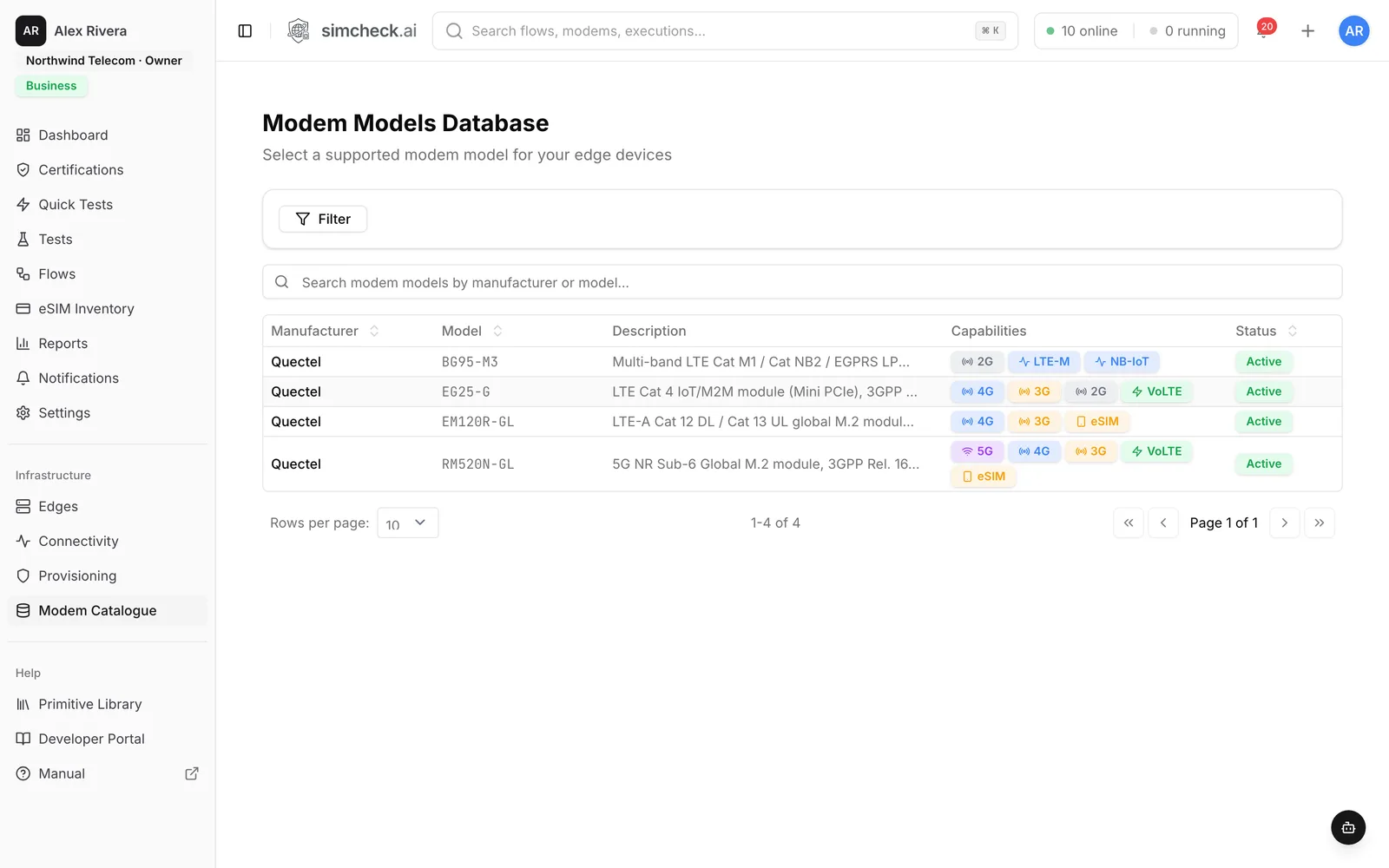
Bring a Quectel BG95-M3, EG25-G, EM120R-GL or RM520N-GL. Every modem is linked to its catalogue model, so a test that needs a technology only lands on a modem that supports it.
Wi-Fi setup from a phone
A device with no saved network raises its own setup hotspot. Join it from your phone, pick your Wi-Fi network on the sign-in page and enter the password, with no keyboard, screen or terminal needed.
Cellular backhaul
For sites without Ethernet or Wi-Fi, dedicate one of the device's modems as its uplink. It acts as failover behind wired and Wi-Fi connections and is excluded from test allocation.
Clusters
Group locations into a named cluster, mixing SimCheck network sites and your own, and run one test across all of them in parallel.
Connectivity runs on your own hardware
Persistent Attach and PLMN Hunt keep a modem attached or hunting for a network for days. They run on private edges only and their modem time isn't token-metered.
Per-modem control and diagnostics
Set each modem's priority, its eSIM provisioning method (SGP.32 through a cloud eIM, or an SGP.22-style LPA) and reset-on-release, and use Health, Activity, Remote and Audit tabs. Devices update their software automatically.
The SimCheck network vs. your own edges
| SimCheck network | Your own edges | |
|---|---|---|
| Hardware | Shared edge gateways run by SimCheck.ai and its hosting partners | Your Linux device with a supported Quectel modem |
| Where | Sites listed as capacity in the console | Anywhere with power and Ethernet, Wi-Fi or cellular backhaul |
| Visibility | Shown per site, not per device | Private to your organization |
| Token use | One token per test of up to five minutes of modem time | Tests are free on every plan |
| Connectivity runs | Not available | Persistent Attach and PLMN Hunt, not token-metered |
| Setup | None | Provisioning token, one-line install, admin approval |
Most teams start on the SimCheck network and add their own edges for markets, labs or customer sites they need to cover continuously. Customers and partners can also host gateways; see the partner program and the network overview.
Supported modems
The Modem Catalogue in the console lists each model's generations, IoT modes, voice and eSIM support, GNSS and exact LTE and 5G NR bands. Check bands as well as generations: a 5G modem is no help on an operator whose 5G band it doesn't cover.
| Quectel model | Class | Good for |
|---|---|---|
| BG95-M3 | LTE-M, NB-IoT and 2G, with GNSS | Low-power IoT attach and MQTT tests |
| EG25-G | LTE Cat 4 with 3G and 2G fallback | Everyday LTE attach, SMS and data checks |
| EM120R-GL | LTE-Advanced Cat 12 | Higher-throughput LTE data testing |
| RM520N-GL | 5G Sub-6 GHz, SA and NSA | 5G SA and NSA, throughput and speed tests |
Modems that only speak AT commands, such as the BG95 modules, can't be used as a cellular backhaul. A supported model is recognized automatically when the device comes online.
Connectivity runs on private edges
Because they take over a modem's registration for hours or days, connectivity runs only run on hardware you own. Persistent Attach holds a SIM attached with a warm data bearer and probes it on an interval to measure how stable a network really is. PLMN Hunt scans for one or more target networks, such as a roaming partner you only see occasionally or a satellite network that passes overhead, and attaches when one appears. Either can fire a saved test on every attach and record packet captures and signaling traces. See PLMN hunt and network monitoring and IoT connectivity testing.
Frequently asked questions
What hardware do I need for my own edge device?
Any Linux device, such as a single-board computer or mini-PC, with internet access and a supported Quectel modem attached over USB or M.2: the BG95-M3, EG25-G, EM120R-GL or RM520N-GL. You also need an owner or admin role in your organization to generate tokens and approve devices.
Does the device need an Ethernet connection?
No. A device with Wi-Fi hardware raises a setup hotspot so you can join it to your Wi-Fi from a phone, and a site with no wired or Wi-Fi network can use one of the device's modems as a cellular backhaul.
Do tests on my own devices cost tokens?
No. Tests on your own edge devices are free on every plan, and connectivity runs on your hardware aren't token-metered either. Tokens apply to tests on the shared SimCheck network.
How many of my own devices can I connect?
The Prototyper plan includes one own device, Business includes up to ten, and Enterprise is unlimited. See the pricing page for current plan details.
How is enrollment secured?
A provisioning token binds a device to your organization, so treat it like a password: prefer single-use tokens, set an expiry and revoke tokens you no longer need. Every new device also waits for an owner or admin to approve it before it joins your fleet.
Can I mix SimCheck network sites and my own in one test?
Yes. A cluster can include SimCheck network sites and your own sites, and a test aimed at the cluster runs at every site in it.
Keep exploring
- ProductGlobal eSIM Test Network on Real ModemsRun eSIM, roaming and IoT tests on SimCheck.ai's network of edge gateways, or connect your own edge device anywhere and test on live cellular networks.
- PlatformQuick TestsTen ready-made tests — attach, SMS, data, speed, iperf3, MQTT, voice and more — run on real modems in one click.
- Use casesPLMN Hunt & Network MonitoringHunt for partner or satellite networks and attach when they appear, or hold a SIM attached for days — on your own edges.
- Use casesIoT Connectivity TestingVerify NB-IoT and LTE-M attach, MQTT round trips and multi-day stability on real modems in every market you deploy.
- CompanyPartner Program – Host an eSIM Test GatewayPartner with SimCheck.ai: host an eSIM test gateway, resell AI-powered eSIM testing or integrate the platform with your connectivity offering.
- ProducteSIM Testing Pricing – Plans from $99/monthSimCheck.ai pricing: Prototyper from $99/month with your own edge device, Business with 500 test tokens a month, and Enterprise with unlimited testing.
Put a real eSIM test device where you need it
Start a free trial on the SimCheck network, then add your own Linux device with a supported Quectel modem in minutes, or talk to us about hosting edges in your markets.