
Platform · Test Like A Mobile
Real-device eSIM testing with a live phone on your screen
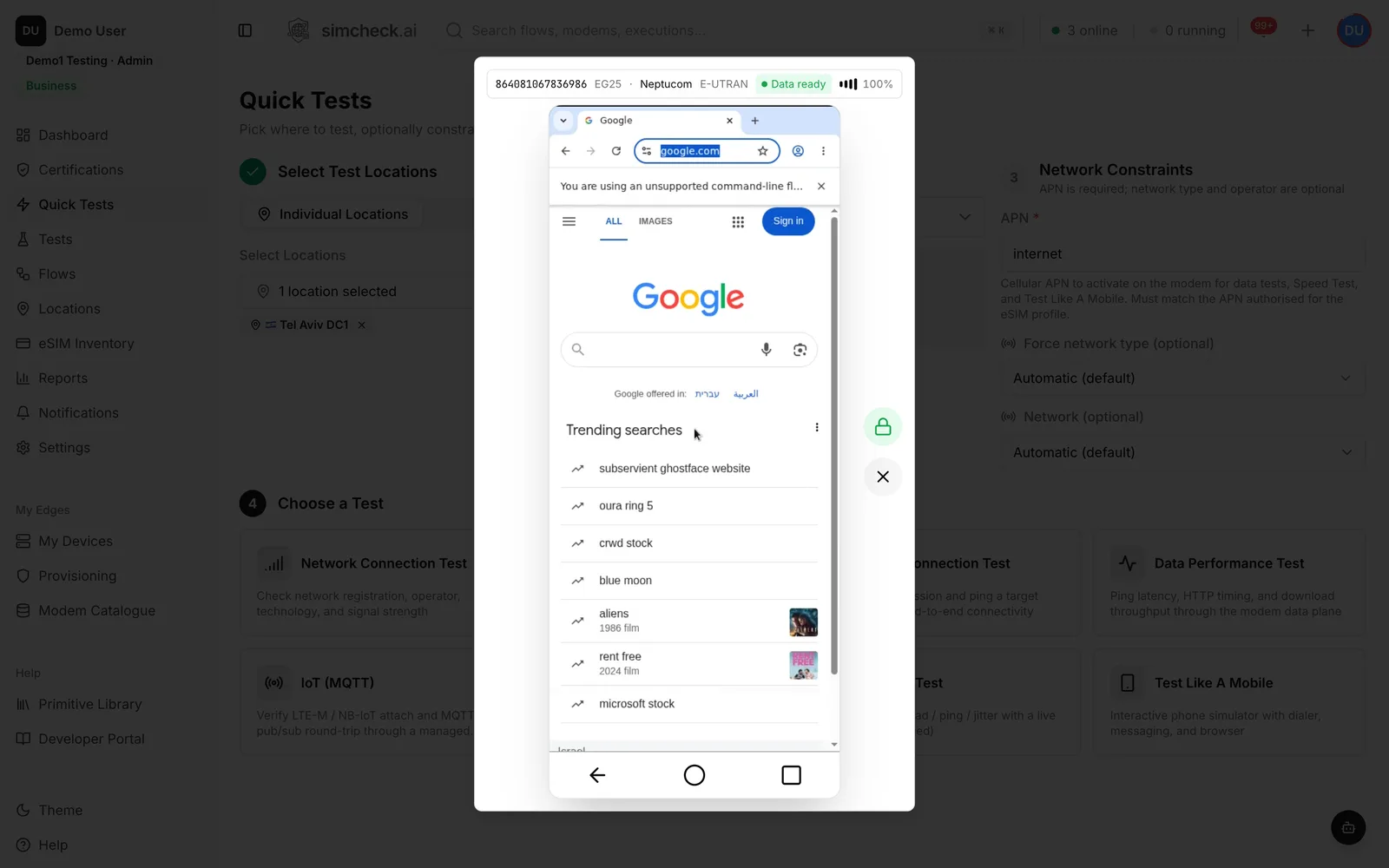
Test Like A Mobile (TLAM) gives you an interactive phone in the browser, driven by a real cellular modem with the eSIM profile you choose. Place real calls, send and receive SMS, and browse the web in a real Chromium browser over the cellular link, so you see exactly what a subscriber on that network sees, without a handset in the country.
Pass/fail results don't show what the customer sees
Automated tests prove that a profile attaches, gets data and delivers an SMS. Many customer complaints are different: "the page won't load", "I'm stuck on a portal", "my call drops when I dial the hotline". Answering them takes a person looking at a real screen on the subscriber's network, and that usually means a handset shipped to the country, a colleague who happens to be traveling, or a long thread with a partner's support desk.
Test Like A Mobile puts that phone on your screen. It runs on the same real modems and eSIM profiles as every other SimCheck.ai test, so anyone on the team can open a live session, see the problem for themselves and hand over the evidence in minutes.
How a Test Like A Mobile session works
- 1
Choose where and which eSIM
Pick a location on the SimCheck network or one of your own edge devices, then a specific eSIM profile or a group. Optionally force the radio technology, lock to an operator by PLMN or override the APN.
- 2
Launch the phone
SimCheck.ai allocates a free modem, downloads the profile and brings up a data session. The status bar shows live telemetry from the radio: IMEI, modem model, operator, technology and signal.
- 3
Use it like a subscriber
Open the Phone, Messages or Browser app. Every action goes through the real modem on the live network, not through a simulated handset.
- 4
End the session
A session holds its modem exclusively so it stays interactive. End it when you're done and the modem returns to the pool; the run is kept in your test history.
A real phone, driven by a real modem
Everything on the screen is happening on a live mobile network, on the eSIM profile you selected.
Dialer
Place and receive real voice calls, send DTMF tones to menus and hotlines, and watch call behavior on the live network.
Messages
Send and receive real SMS on the SIM, with delivery status for each message.
Real Chromium browser over cellular
A real Chromium browser runs inside the modem's data connection. Pages load over the cellular link and are localized to the SIM's network, including operator redirects and captive portals.
Live radio telemetry
The status bar reports IMEI, modem model, operator, radio technology and signal straight from the modem.
Any profile in your inventory
Use any eSIM you have added as an activation code or QR code, or point the session at a group and let the allocator pick a free profile.
Network and technology control
Force 5G SA, 5G NSA, LTE, LTE-M, NB-IoT, 3G or 2G, lock the session to a specific operator by PLMN, and override the APN, within what the allocated modem supports.
The SimCheck network or your own edges
Open a session on shared SimCheck network capacity, or on your own edge device anywhere you have one. Tests on your own devices don't consume tokens.
What teams use Test Like A Mobile for
- Reproduce customer complaints. When a ticket says "no internet" or "can't call", open a session with the same profile, or one from the same group, on the same network and see whether the problem is the network, the plan or the customer's device.
- Check captive portals, APN and browsing on a travel eSIM. Confirm that a destination's profile comes up on the right APN, that browsing works without a stray portal or redirect, and that local sites load as a traveler would expect.
- Verify zero-rating. Open a self-care portal, top-up page or other zero-rated destination in the browser and confirm it loads when it should, including on a profile whose data allowance has run out.
- Demo to stakeholders. Show partners, sales prospects or executives a live eSIM working on a real network in another market, on screen, instead of describing it in a slide.
Pair the human view with repeatable evidence
Test Like A Mobile answers "what does the subscriber see?". Once you know, turn the check into something that runs without you. The Quick Tests cover attach, SMS, data, speed and voice with a pass/fail verdict, decoded signaling and packet captures, and the Voice Call Check reports the bearer, setup time and outcome of a real call. Save the same setup as a configuration and schedule it to keep watching a destination, and see how this fits a travel eSIM quality program.
Frequently asked questions
Is Test Like A Mobile an emulator or a device farm?
No. Each session runs on a real cellular modem with a real eSIM profile on a live network. The browser's traffic goes over the modem's cellular data session, and calls and SMS go through the mobile network.
Will I see the same web pages a subscriber in that country sees?
Pages load over the cellular link and are localized to the SIM's network, so operator landing pages, captive portals and geo-specific redirects appear the way they do for a subscriber on that operator.
Can I make and receive phone calls?
Yes. The dialer places and receives real voice calls and can send DTMF tones. For measured results such as the bearer used, call setup time and a recording, run the Voice Call Check Quick Test.
How are sessions billed?
On the SimCheck network, one token covers up to five minutes of modem time, and a longer session uses one more token for each additional five minutes. Sessions on your own edge devices don't consume tokens.
Why do I need to end the session?
A session holds its modem exclusively so the phone stays interactive. Ending it releases the modem back to the pool for other tests and teammates.
Keep exploring
- PlatformQuick TestsTen ready-made tests — attach, SMS, data, speed, iperf3, MQTT, voice and more — run on real modems in one click.
- Use casesTravel eSIM MonitoringVerify each destination's partner networks, speed and browsing on real modems, and monitor every country you sell.
- SolutionsFor MVNOs & eSIM ProvidersTest every profile batch, verify partner networks per country and reproduce customer tickets on real modems.
- Use casesRoaming TestingLock tests to each partner by PLMN, verify data, SMS and voice, and track every pair in a roaming matrix.
- Use casesVoLTE & Voice TestingPlace real calls and see IMS registration, bearer, setup time, outcome and a recording — at home and roaming.
- ProducteSIM Testing Pricing – Plans from $99/monthSimCheck.ai pricing: Prototyper from $99/month with your own edge device, Business with 500 test tokens a month, and Enterprise with unlimited testing.
Open a live phone on a real network
Start a free trial and launch a Test Like A Mobile session with your own eSIM profiles, or talk to us about reproducing a customer issue in a specific market.