
Use cases · PLMN Hunt & Monitoring
PLMN scan, hunt and long-running network monitoring
A PLMN scan lists the mobile networks a modem can see; a PLMN hunt keeps scanning until a specific target network appears, then attaches and runs a test. SimCheck.ai connectivity runs do both on your own edge devices — hunting for partner or satellite networks that are only present some of the time, or holding a SIM attached for days to measure how stable a network really is — with every scan, attach, detach and failure cause recorded.
Some networks are only there some of the time
Most testing assumes the network is present: pick a SIM, attach, run a check. But some of the networks that matter most aren't always there. A roaming partner may only be visible at the edge of coverage. A satellite network is overhead only during a pass. And a terrestrial network that looks fine in a five-minute test may detach devices every few hours, which is what actually breaks a fleet.
Catching these takes patience no person can provide: scanning around the clock, attaching the moment a target appears, testing while the window is open, and recording the times nothing was found. Ad-hoc scripts on a lab box do some of this, but they rarely keep evidence, survive restarts or produce results anyone else can read.
How connectivity runs work
- 1
Use your own edge device
Connectivity runs take over a modem's registration for their whole lifetime, so they run on edge devices your organization owns — any Linux box with a supported Quectel modem.
- 2
Choose PLMN Hunt or Persistent Attach
Hunt for one or more target networks by MCC-MNC, optionally restricted to specific LTE bands, or hold a SIM attached with a warm data bearer.
- 3
Set the rules
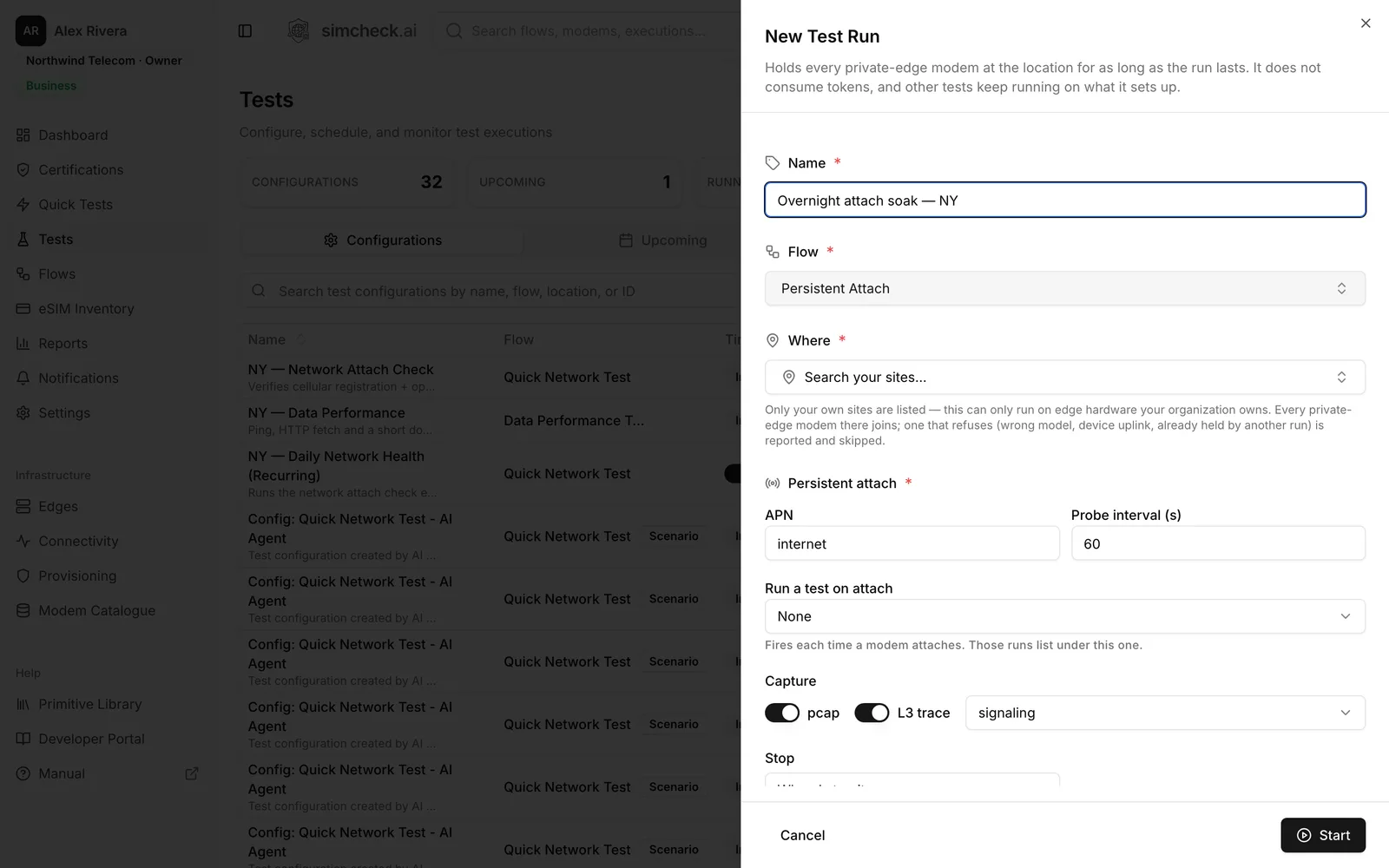
Set the APN and probe interval, the hunt schedule and attach policy, a saved test to fire on every attach, packet capture and signaling trace, and when to stop.
- 4
Watch it live
Follow attach attempts, attaches, detaches, scans, probes and fired tests in real time, with a cause on every failure, and see every managed modem on the fleet Connectivity page.
What connectivity runs give you
PLMN Hunt
Scan for one or more target networks by MCC-MNC and attach only when one is actually seen, optionally restricted to specific LTE bands.
Hunt schedules
Scan continuously, open recurring windows on a cadence you set, or paste exact start and end times — for example, from a satellite pass schedule.
Attach policy and hold
Attach only when the target is seen or always inside a window, stay attached for a set time, and sit detached or fall back to any available network between windows.
Persistent Attach
Hold a SIM attached with a warm data bearer for hours or days, and probe that traffic still passes on the interval you set.
Test on every attach
Fire a saved configuration each time the modem attaches, for real ping, data or voice results from the moment the network came back.
Packet capture and signaling
Capture packets and signaling traces for the evidence behind a failure, downloadable from the run.
Fleet Connectivity view
One page lists every modem in a connectivity run, with state, current PLMN, last scan, 24-hour uptime and attach success, position and module temperature.
Not token-metered
Connectivity runs use hardware you own, so their modem time doesn't consume tokens. Tests they fire follow the normal rules.
PLMN Hunt use cases
- Partner networks seen only at the edge. Place an edge device near a border or in a fringe area and hunt for a specific roaming partner. When it appears, attach and run a data or voice test to prove the agreement works on that network. See roaming testing.
- Satellite and non-terrestrial networks. 3GPP Release 17 introduced non-terrestrial network support for 5G NR and for NB-IoT and LTE-M devices. A satellite network may only be visible during a pass, so where your modem supports the network, hunt in uploaded windows that match the pass schedule and keep both the attaches and the scans that found nothing.
- New network launches. Hunt for a newly announced network and log the first time a modem at your site sees it.
- Network selection under steering. Watch which networks appear and which one the modem ends up on when steering of roaming is active.
Every target is a PLMN — the MCC-MNC pair that identifies a mobile network.
Persistent Attach for long-running monitoring
A five-minute test proves a network works at that moment. Persistent Attach answers the question fleets care about: does it stay working? The run keeps a SIM attached with a warm data bearer, probes on your interval, counts attach attempts, attaches, failures, detaches and probes, and records the cause of every failure.
Typical uses:
- Measure how often a network detaches devices over days, and how long re-attach takes.
- Keep a site's SIM registered so it is ready the moment a test needs it.
- Fire a data or voice test on every re-attach to see how the service behaves right after recovery.
- Compare stability between operators or profiles at the same site.
For IoT fleets, combine it with IoT connectivity testing for NB-IoT and LTE-M attach and MQTT checks.
Private edges, packet captures and evidence
Connectivity runs only run on your own edge devices. You pick one of your sites, and every private-edge modem there joins the run. A modem that can't take part — wrong model, reserved as the device's own uplink, or held by another run — is listed with the reason rather than silently skipped.
When counters aren't enough, turn on capture. Packet captures and signaling traces are kept with the run, and the decoded signaling shows the network's reject cause whenever an attach fails. The run view also lists every scan, including the ones that found nothing — which is often the point.
Adding an edge takes a provisioning token and a one-line install on a Linux machine with a supported modem, followed by your approval in the console.
Frequently asked questions
What is a PLMN scan?
A PLMN scan is a modem's search for available mobile networks, each identified by its PLMN code (MCC plus MNC). It shows which operators are visible at a location. On SimCheck.ai, each site lists the operators its modems have seen in recent scans.
What is a PLMN hunt?
A PLMN hunt scans repeatedly for one or more target networks and attaches only when one is actually seen. It suits networks that are present only some of the time, such as a fringe roaming partner or a satellite network during a pass.
Can SimCheck.ai test satellite (NTN) networks?
PLMN Hunt is built for networks that aren't always present, including non-terrestrial networks that pass overhead, with hunt windows set from exact start and end times. Whether a given satellite network can be tested depends on the modem supporting it — check the Modem Catalogue or talk to us.
How long can a connectivity run last?
As long as you need — hours or days. A run stops when you stop it, after a set duration or at a set time, and there is always a stop button on the run itself.
Do connectivity runs use tokens?
No. Connectivity runs use hardware your organization owns, so their modem time isn't metered. Any test a run fires on attach is an ordinary run and follows the ordinary rules.
Can connectivity runs use the shared SimCheck network?
No. Because a connectivity run takes over a modem's registration for its whole lifetime, it runs only on edge devices your organization owns. Quick Tests and scheduled tests can use the shared network.
Keep exploring
- PlatformEdges & NetworkThe SimCheck network plus your own edge devices anywhere, built from a Linux box and a supported Quectel modem.
- Use casesRoaming TestingLock tests to each partner by PLMN, verify data, SMS and voice, and track every pair in a roaming matrix.
- Use casesIoT Connectivity TestingVerify NB-IoT and LTE-M attach, MQTT round trips and multi-day stability on real modems in every market you deploy.
- GlossaryPLMN (Public Land Mobile Network)A PLMN is a mobile network identified by its MCC and MNC. Learn how PLMN IDs, home and visited PLMNs, and PLMN selection affect registration and roaming.
- GlossaryMCC/MNC (Mobile Country Code / Mobile Network Code)MCC and MNC are the codes that identify a mobile network: a 3-digit country code plus a 2- or 3-digit network code. Learn their format and how they are used.
- GlossaryAttach Reject CauseAn attach reject cause is the code a network sends when it refuses a device's registration. Learn the common 3GPP EMM causes such as #7, #11, #13 and #15.
Put a network under watch
Start a 30-day free trial, or talk to us about setting up your own edge devices for PLMN hunts and long-running monitoring.