
Platform · Flows & Scheduling
Telecom test automation, from a single check to a scheduled flow
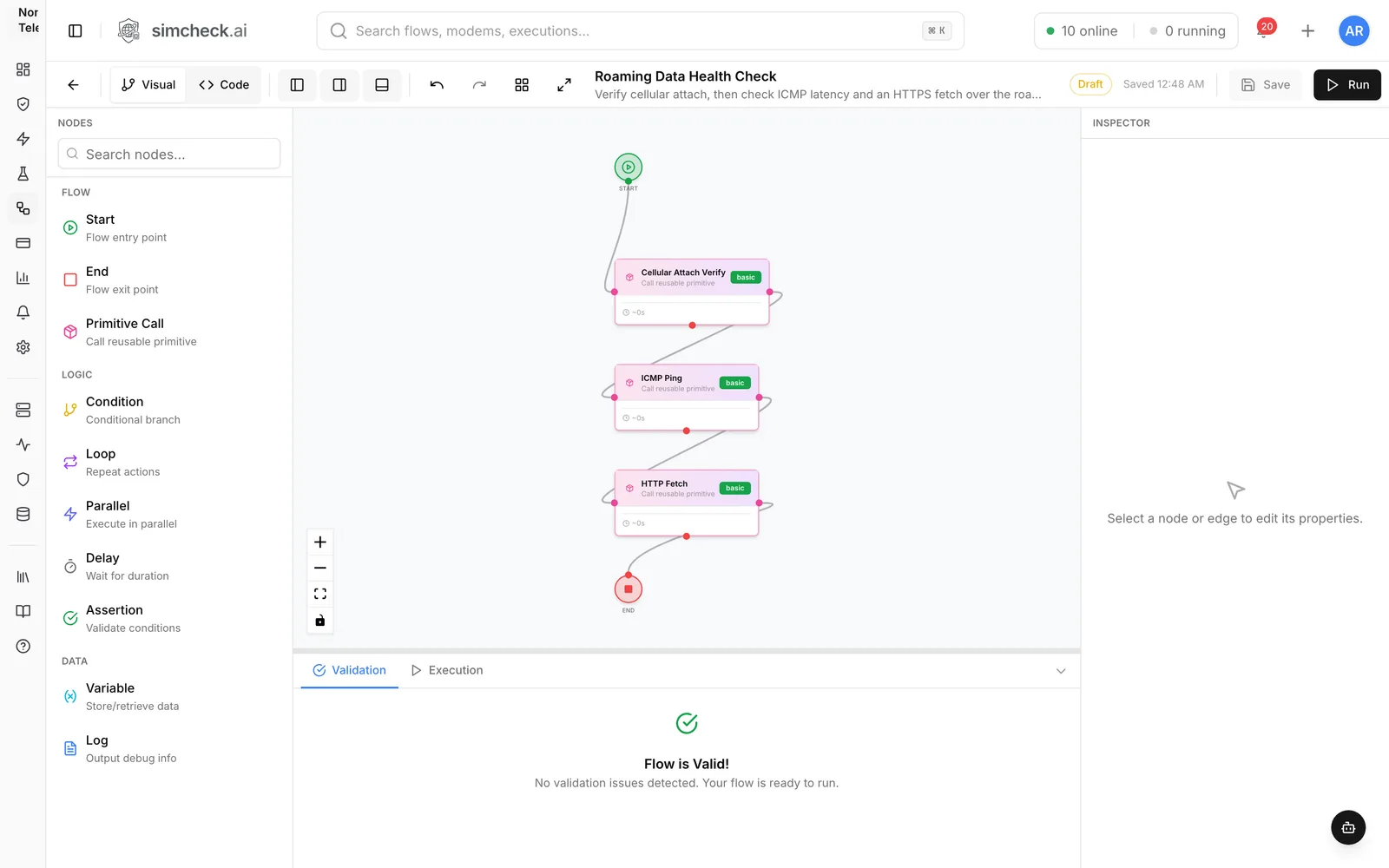
Flows let you chain cellular, data, voice, SMS and IoT operations into a multi-step test on a visual canvas, then run it on real modems on demand, once at a set time or on a recurring interval. Every run lands in your history with logs and evidence, and reports can be emailed on a schedule or whenever a test completes.
Manual test runs don't scale to every network, every day
A single check proves one thing at one moment. Real assurance is a sequence (attach, confirm registration, bring up data, resolve DNS, fetch a page, measure throughput) repeated for every profile, every network and every day. Most teams end up with scripts on lab PCs that send raw AT commands, break when a modem model changes and only run when the engineer who wrote them remembers to start them.
Flows move that logic into the platform. You compose tests from building blocks SimCheck.ai maintains, run them on any capable modem on the SimCheck network or your own edge devices, schedule them like monitoring jobs and get the results as reports in your inbox.
From building blocks to a scheduled test
- 1
Start from primitives
Browse the Primitive Library: dozens of validated building blocks across Cellular, Data, Voice, SMS and IoT, such as Cellular Attach Verify, DNS Query, ICMP Ping and SMS Send.
- 2
Compose the flow
Drag Primitive Call nodes onto the canvas and connect them. In the Inspector, pick the primitive and map its inputs to literal values or to variables produced by earlier steps.
- 3
Add logic, validate and save
Insert conditions, loops, parallel branches, delays and assertions. The validation panel flags problems as you build; resolve them, save and run.
- 4
Schedule it
Start a new run with the flow, a location or cluster, an eSIM or group and any network constraints, then choose run now, once at a date and time, or recurring. Save it as a configuration to re-run later.
- 5
Track and report
Watch scheduled work under Upcoming and Running, review every result in History, retry failures with one click and have reports emailed on a schedule or when the test completes.
Everything you need to automate real-network tests
Flows run on real cellular modems with real eSIM profiles on live networks, exactly like Quick Tests.
Validated primitives
Primitives handle the actual modem operations and are maintained and validated by the platform, so a flow can never issue an unsafe or malformed modem command.
Logic and data nodes
Beyond Start, End and Primitive Call nodes, flows use Condition, Loop, Parallel, Delay and Assertion nodes for test logic, plus Variable and Log nodes for data.
Saved configurations
Save the full setup of a run (flow, location, eSIM selection, constraints and timing) and run, edit, duplicate or delete it from one list.
Run now, once or on a recurring interval
Schedule a run for a specific date and time or every N minutes, hours or days. Pause a recurring schedule with a toggle and resume it later; the next run is re-anchored to the cadence instead of firing for every missed slot.
Queue, cancel and retry
Upcoming lists every scheduled run, Running lets you cancel a test (tearing down its call or data session and releasing the modem), and History keeps logs for every run with Retry on any failure.
Fan out across clusters
Point one run at a cluster of locations and it runs at every site in parallel. Sites that can't serve the run report why, and the rest still return results.
Reports and email delivery
Thirteen built-in reports, a custom report builder, drill-down to individual runs and CSV or PDF export, with scheduled or on-completion email delivery.
Scheduling that works like monitoring
A recurring data or network test against a roaming eSIM is a simple uptime monitor for a destination. Run it every hour on the profiles you sell, pause it during a maintenance window without losing its settings, and set a report delivery that fires only on failure so a healthy week stays quiet. For roaming programs, the same runs feed the roaming matrix; for travel eSIM brands, see travel eSIM quality monitoring. For IoT fleets, a flow can combine an LTE-M or NB-IoT attach with an MQTT round trip and run it on a schedule, as described in IoT connectivity testing.
Reports and email delivery
Every run is recorded with where it ran, which operator it attached to, the technology and band, latency, throughput, call quality and the outcome. Reports turn that history into answers:
- Thirteen built-in reports, including the Roaming matrix (home operator × visited operator), Coverage by operator, data performance by country, fleet health by modem model, failure analysis and flow success rate.
- A custom builder: group rows by location, country, operator, RAT, modem, eSIM profile, failure class or time, and pick measures such as success rate, attach time, data RTT, throughput, voice MOS or signal.
- Drill-down from any number to the runs behind it, and from a run to its full details.
- Delivery as CSV or PDF links by email, either on a daily, weekly or monthly schedule or each time a saved test configuration completes, on every run or only on failure. Recipients are picked from your organization's members.
Automate from your own tooling
Anything you can do in the console you can also do over the API: create an API key to drive tests from scripts or CI, and add webhooks so SimCheck.ai notifies your systems when events happen. If you'd rather describe a test than draw it, the AI assistant can help build flows and start runs after you approve them. For one-off checks, Quick Tests run the same building blocks in one click.
Frequently asked questions
Do I need to write code to build a flow?
No. The flow builder is a visual drag-and-connect canvas, and primitives take care of the modem operations. If you prefer code, the API and webhooks let you trigger runs and receive results from your own systems.
What is the difference between a primitive and a flow?
A primitive is a single, validated operation maintained by the platform, such as an ICMP ping, a DNS query or a cellular attach check. A flow is your own multi-step test that chains primitives together with logic such as conditions, loops and assertions.
Can one scheduled test run at several locations?
Yes. Target a cluster instead of a single location and the run fans out to every site in it in parallel. A cluster can include SimCheck network sites and your own edge devices.
Can I pause a recurring schedule without deleting it?
Yes. Each recurring schedule has an on/off toggle. Switching it off stops it firing and keeps all its settings; switching it back on resumes the cadence without immediately running every missed occurrence.
How do I get results without logging in?
Save a report and schedule its delivery by email, daily, weekly, monthly or each time a saved test completes, optionally only when it fails. Webhooks can also push events to your own systems.
Do scheduled runs use tokens?
Scheduled runs follow the same rules as any test. On the SimCheck network, one token covers a test of up to five minutes of modem time. Tests on your own edge devices don't consume tokens.
Keep exploring
- PlatformQuick TestsTen ready-made tests — attach, SMS, data, speed, iperf3, MQTT, voice and more — run on real modems in one click.
- PlatformAI Assistant & MCPAsk in plain English to look up results, analyze failures, build flows and start tests, in the console or via MCP.
- Use casesRoaming TestingLock tests to each partner by PLMN, verify data, SMS and voice, and track every pair in a roaming matrix.
- Use casesTravel eSIM MonitoringVerify each destination's partner networks, speed and browsing on real modems, and monitor every country you sell.
- Use casesIoT Connectivity TestingVerify NB-IoT and LTE-M attach, MQTT round trips and multi-day stability on real modems in every market you deploy.
- ProducteSIM Testing Pricing – Plans from $99/monthSimCheck.ai pricing: Prototyper from $99/month with your own edge device, Business with 500 test tokens a month, and Enterprise with unlimited testing.
Automate your first flow
Start a free trial, build a flow from the primitive library and schedule it on real modems, or talk to us about automating testing across your markets.